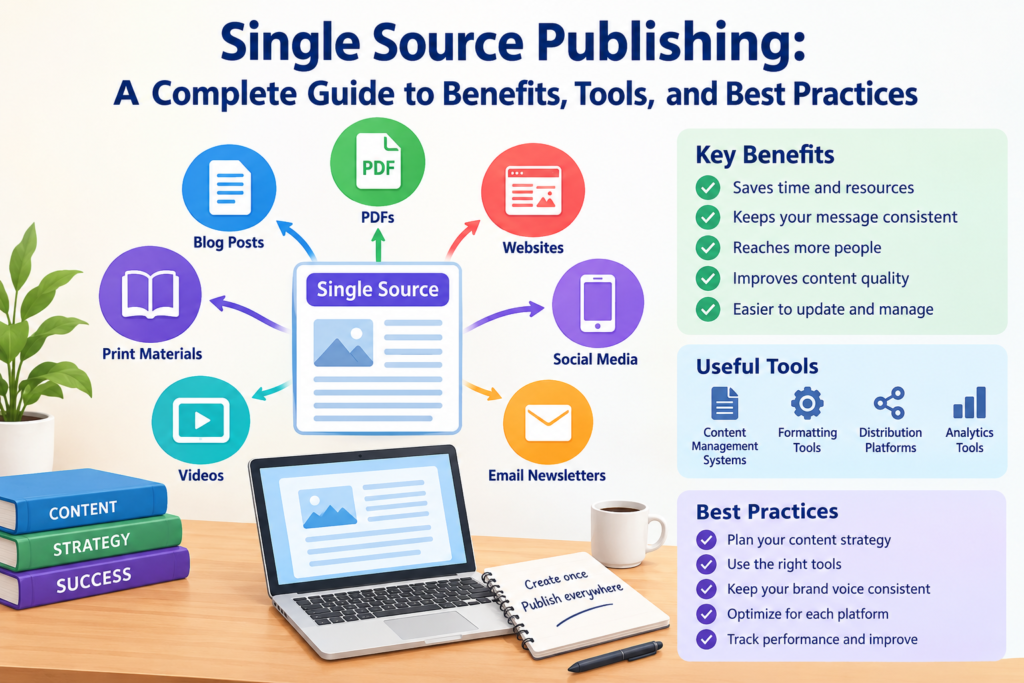

Creating content for different platforms can take a lot of time. Writers often need to update websites, product guides, help pages, and printed documents. Managing every version separately can create mistakes and extra work. This is where single source publishing becomes useful.
This approach allows teams to create content once and reuse it in different formats. Instead of rewriting the same information, they manage it from one central source. They can then publish it as a website page, PDF, online guide, or other document. This makes content easier to maintain and share.
Businesses, bloggers, technical writers, and marketing teams can all benefit from this method. It helps them save time and keep information consistent. In this guide, you will learn how single source publishing works, why it matters, which tools can help, and how to build a simple publishing process.
1. What Is Single Source Publishing?
Single source publishing is a content management method that uses one main source to create several different outputs. These outputs may include web pages, PDFs, printed manuals, training materials, and digital guides. The central content stays in one place, making updates easier to manage.
For example, imagine a company that sells a kitchen appliance. It needs a user manual, a website guide, and a downloadable PDF. With separate documents, the writer must update each version whenever instructions change. This can cause errors if one document remains outdated.
With single source publishing, the company can maintain the instructions in one central source. The publishing system then uses that content to create different versions. Each version can have its own layout while sharing the same basic information.
The main goal is simple. Create useful content once, maintain it carefully, and reuse it wherever needed. This approach supports better content management and reduces repeated work.
2. How Does Single Source Publishing Work?
The process begins when a writer creates content in a central location. This location might be a content management system, a documentation platform, or a structured authoring tool. The content is then organized into sections, topics, or reusable blocks.
Next, the team chooses where the information needs to appear. It might be published on a website, inside a help center, or within a PDF guide. Publishing software can apply different layouts and formatting rules to the same source material.
For example, a software company may write one explanation of its password reset feature. The explanation can appear in its online help center and customer training guide. If the instructions change, the writer updates the central topic and generates the required outputs again.
The exact process depends on the tools used. Some systems offer automatic publishing, while others require manual steps. Teams should also review the final versions before sharing them. This helps prevent formatting problems and ensures that the content remains accurate.
3. Key Features of Single Source Publishing
A good publishing workflow includes features that make content easier to create, organize, and reuse. The most useful features depend on the size of the team and the type of information it publishes.
Common features include reusable content blocks, version control, templates, and support for multiple output formats. Some platforms also provide approval workflows and publishing automation. These features help teams manage large amounts of information without repeating every task.
Content reuse is especially helpful when the same instructions appear in several places. Templates help maintain a consistent design. Version control helps writers track changes and review earlier content when needed.
Another useful feature is conditional content. It allows a team to show different information to different audiences or platforms. For example, a product guide may include advanced instructions for professional users. A beginner guide may display simpler steps instead.
Together, these features create a more organized publishing process. Teams can choose the tools they need and build a workflow that fits their goals.
4. Main Benefits of Single Source Publishing
One major benefit is reduced duplication. Writers no longer need to maintain several independent copies of the same information. This can save time, especially when a business publishes many guides or support articles.
Another benefit is consistency. When shared information comes from one source, teams can reduce differences between documents. Customers are less likely to find conflicting instructions on a website and inside a product manual.
This method can also make updates easier. A change to a central topic can be used in several publishing outputs. The team still needs to regenerate and check those outputs, but it avoids rewriting the same material repeatedly.
Single source publishing can improve teamwork, too. Editors, subject experts, and designers can work with a more organized content structure. Clear roles and approval steps help prevent unwanted changes.
However, these benefits depend on good planning. Poorly organized content can still create problems. Teams should use clear naming rules, review processes, and regular quality checks to get the best results.
5. Single Source Publishing for Websites and Blogs
Websites and blogs often cover related subjects across many pages. A business may publish product descriptions, frequently asked questions, tutorials, and support articles. Some information needs to appear in more than one location.
A centralized content approach can help writers manage these materials. For example, a software blog might maintain a reusable explanation of account security. That information could support a tutorial, a customer help page, and a training resource.
This does not mean every page should contain identical text. Each page should serve its own purpose and audience. A blog article may explain a topic in detail, while a support page may focus on quick steps.
Writers should also review search intent before reusing content. Search engines and readers benefit from pages that provide clear, distinct value. Reusing a central source should make content more useful, not create many nearly identical pages.
With careful planning, single source publishing can help website owners manage updates while keeping their content organized and helpful.
6. Popular Tools for Single Source Publishing
Several types of software can support a centralized publishing workflow. The right choice depends on the content format, team size, technical skills, and budget.
Examples include structured documentation systems, component content management systems, and digital publishing platforms. Tools such as Adobe FrameMaker, MadCap Flare, and Paligo support different forms of structured or technical content creation. Other teams may use a content management system with reusable components and suitable publishing features.
Before selecting a tool, consider the formats you need. A team producing technical manuals may need structured authoring and conditional content. A marketing team may care more about website integration and editorial workflows.
Ease of use is also important. Complicated software can slow down writers if the team lacks training. Review collaboration features, accessibility support, version control, and publishing options before making a decision.
Always test a tool with a small project first. This lets you discover limitations before moving your entire content library. Compare actual workflow results rather than relying only on product descriptions.
7. Single Source Publishing vs. Traditional Publishing
Traditional publishing often involves maintaining separate documents for different channels. A writer may keep one file for a website, another for a PDF, and another for a printed manual. Each version may require its own updates and reviews.
Single source publishing takes a different approach. It keeps shared information in a central source and uses that content to produce several outputs. This can reduce duplicated work and make shared updates easier.
However, traditional publishing still has a place. A short article that appears in only one location may not need a complex publishing system. Separate files can be easier to manage for small projects with few updates.
The best choice depends on the scale of the work. Organizations with many related documents may gain more from content reuse. Small teams with simple needs may prefer a basic workflow.
The goal is not to use the most advanced software. It is to choose a process that saves time, supports accuracy, and fits the needs of the people creating and reading the content.
8. How to Create a Single Source Publishing Workflow
Start by identifying the content your team creates most often. Look for repeated instructions, product details, support answers, or training information. These are good candidates for central storage and reuse.
Next, organize the content into small, meaningful sections. Give each section a clear name and purpose. Avoid storing several unrelated topics inside one large document when they may need separate updates.
Choose a platform that supports your publishing needs. Set up templates for the formats you use regularly. Decide who can create, edit, approve, and publish each type of content.
Then test the process with a small project. Create one source and publish it in two formats. Check the wording, layout, links, headings, and images in each output. Record any problems and improve the workflow before expanding it.
Finally, create a schedule for reviewing content. Assign responsibility for important topics and remove outdated material when necessary. A clear process helps the team maintain quality as the content library grows.
9. Common Challenges and How to Solve Them
One challenge is poor content organization. If writers cannot find the correct source, they may create duplicate sections or use outdated information. Clear naming rules, topic categories, and search tools can help prevent this problem.
Another challenge is training. Team members may be unfamiliar with structured content, templates, or publishing settings. Short training sessions and simple instructions can make the transition easier.
Formatting can also become difficult. Content that looks good on a website may not fit a printed page. Teams should create suitable templates for each output and test the results before publishing.
Version control is another important concern. Several people may edit the same topic or publish changes at different times. Clear permissions and review steps can reduce confusion.
Finally, some teams expect complete automation. In reality, many workflows still need human review. Writers should check facts, tone, layout, accessibility, and links after publishing. Technology can reduce repetitive work, but careful editing remains essential.
10. Best Practices for Better Publishing Results
Good results begin with a clear content strategy. Decide which information should be reused and which material needs a separate version. Not every paragraph belongs in every output.
Keep content blocks focused. A short section about one topic is usually easier to update than a long section containing many unrelated ideas. Reusable blocks should also include enough context to make sense wherever they appear.
Use consistent templates and style rules. These help maintain readable headings, spacing, language, and visual design. Teams should also create guidelines for naming files and managing revisions.
Review content regularly. Product details, instructions, prices, and links can become outdated. Assign content owners who can check important information at planned intervals.
Accessibility should remain a priority. Use descriptive headings, meaningful link text, alternative text for informative images, and readable layouts. Check that the final output works for the intended audience.
Most importantly, measure the results. Track update time, duplicated content, publishing errors, and reader feedback. These measures can show whether the new process is helping the team.
11. The Role of Automation in Single Source Publishing
Automation can make publishing faster by handling repeated tasks. Depending on the platform, a team may generate several document formats from the same content or send approved information to different channels.
For example, a company might maintain product specifications in a structured content system. When the specifications change, the publishing workflow can generate updated web content and downloadable documents. This reduces the need to copy information manually.
Some platforms also support automated checks. These may identify missing fields, broken links, or content that does not follow certain rules. Such checks can help writers find problems before publication.
However, automation does not guarantee accuracy. A system may publish incorrect information if the source contains a mistake. It may also create awkward layouts if the templates are poorly designed.
The best approach combines automation with human review. Let software handle suitable repetitive tasks, while editors check meaning, accuracy, readability, and design. This balance can make the workflow both faster and more reliable.
12. Single Source Publishing for Small Businesses
Small businesses often work with limited time and staff. The same person may manage a website, write product information, prepare customer guides, and answer common questions. Repeating the same work across several documents can become difficult.
A simple centralized content system can help. A small online store, for example, might maintain product measurements, care instructions, and warranty details in one organized source. The information can then support product pages, customer emails, and downloadable guides.
Businesses do not always need expensive software to begin. A well-organized content management system or shared documentation workspace may be enough for a small project. The important part is keeping one approved version of shared information.
Start with content that changes often or appears in several places. Create a simple update checklist and assign responsibility for each topic. As the business grows, it can explore more advanced publishing tools.
This gradual approach helps small teams improve consistency without making their workflow unnecessarily complicated.
13. How Single Source Publishing Supports Content Quality
Content quality depends on more than correct spelling. Readers need accurate facts, clear explanations, useful examples, and a consistent experience across different channels. A central content source can support these goals when managed carefully.
For example, a company may publish safety instructions in a user manual and an online help center. If both versions use approved content, the company can reduce the risk of conflicting guidance. Reviewers can focus on checking the source and the final outputs.
A shared source also makes it easier to assign responsibility. Teams can record who reviewed a topic and when it was last updated. This information can support stronger editorial control.
Still, content quality requires judgment. A single source can contain errors that spread across every output. Writers should verify claims, use reliable references, and ask qualified experts to review specialized information.
For public-facing content, teams should also consider accessibility and reader needs. Clear language, helpful headings, and practical examples make information easier to understand. A good publishing process supports these standards at every stage.
14. Is Single Source Publishing Good for SEO?
Single source publishing can support search engine optimization by making website content easier to maintain. Teams can update shared facts, improve outdated explanations, and keep important information consistent across relevant pages.
For example, a company may reuse approved product specifications in its website content and support materials. When a specification changes, the team can update the source and review each affected page. This can reduce conflicting details.
However, using one source does not automatically improve search rankings. Search performance still depends on relevance, content quality, technical health, user experience, and other factors. Pages should answer real questions and offer useful information.
Avoid publishing many nearly identical pages simply because content reuse is easy. Each page should have a clear purpose and serve a distinct user need. Use suitable titles, descriptive headings, internal links, and helpful explanations.
Also, remember that search engines may treat duplicate or very similar pages differently depending on their purpose and setup. Review your site structure carefully. The main goal should be helpful content, not creating extra pages without a clear reason.
15. The Future of Single Source Publishing
Digital content continues to appear across websites, mobile devices, online learning systems, and customer support platforms. Organizations need practical ways to maintain this information without creating unnecessary work.
Centralized content and structured authoring can help meet this need. As publishing platforms develop, teams may gain better collaboration tools, automated checks, and more flexible output options.
Artificial intelligence may also assist with drafting, tagging, summarizing, and reviewing content. However, generated material still needs careful checking. Teams must protect sensitive information and verify important claims before publication.
Another important trend is content personalization. Businesses may want to present different information to beginners, experienced users, or customers in different regions. Reusable content and clear metadata can help support these needs when the publishing platform allows it.
The future will not look the same for every organization. Some teams will need advanced systems, while others will succeed with simple tools. The strongest approach will remain focused on accuracy, useful information, efficient updates, and the needs of the reader.
Conclusion
Single source publishing offers a practical way to manage content across multiple formats. It allows teams to maintain shared information in one central place and reuse it for websites, PDFs, manuals, and other materials. This can reduce repeated work, improve consistency, and simplify updates.
Success depends on more than choosing the right software. Teams need organized content, clear ownership, suitable templates, and regular quality checks. They must also review each published version to ensure that it meets the needs of its audience.
If you are considering this approach, begin with one small project. Identify repeated content, organize it into reusable sections, and publish it in two formats. Review the results before expanding the process.
Have you used a centralized publishing workflow for your website or business? Share your experience, challenges, or questions. Your insights may help other content creators find a better way to manage their work.
Frequently Asked Questions (FAQs)
1. What is single source publishing in simple words?
Single source publishing means creating and maintaining content in one central place. That content can then be used to create several formats, such as web pages, PDFs, and user guides. It helps reduce repeated work and keeps shared information more consistent.
2. What are the main benefits of single source publishing?
The main benefits include easier updates, less duplicated work, improved consistency, and better content organization. It can also support collaboration and help teams manage large content libraries. Results depend on the quality of the workflow and the tools being used.
3. Which tools support single source publishing?
Several documentation and publishing platforms support this method. Examples include Adobe FrameMaker, MadCap Flare, and Paligo. Other content management systems may also offer reusable content features. Compare output formats, collaboration options, costs, and ease of use before choosing a tool.
4. Is single source publishing useful for SEO?
Yes, it can support SEO by making website content easier to update and maintain. However, it does not guarantee higher rankings. Pages still need original value, clear answers, helpful structure, and a good user experience.
5. Is single source publishing suitable for small businesses?
Yes. Small businesses can begin with a simple content management system or shared documentation workspace. They can store frequently reused information centrally and update it when needed. More advanced tools may become useful as the content library grows.
6. What is the difference between single source publishing and content reuse?
Content reuse means using existing content in more than one place. Single source publishing is a broader workflow that maintains central content and uses it to create different outputs. Content reuse is often one of the main features of single source publishing.